Automated Board Detection
The app locates the 8×8 grid on your screen, verifies piece presence, and begins analysis automatically. If focus is lost, it can re-detect the board seamlessly.
LunaChess automatically detects the board on your screen, tracks the position, and overlays suggested moves as clear arrows. Choose your engine, ELO level, line count, and arrow styling — the rest happens in real time.
Windows Free Local analysis No chess account connection required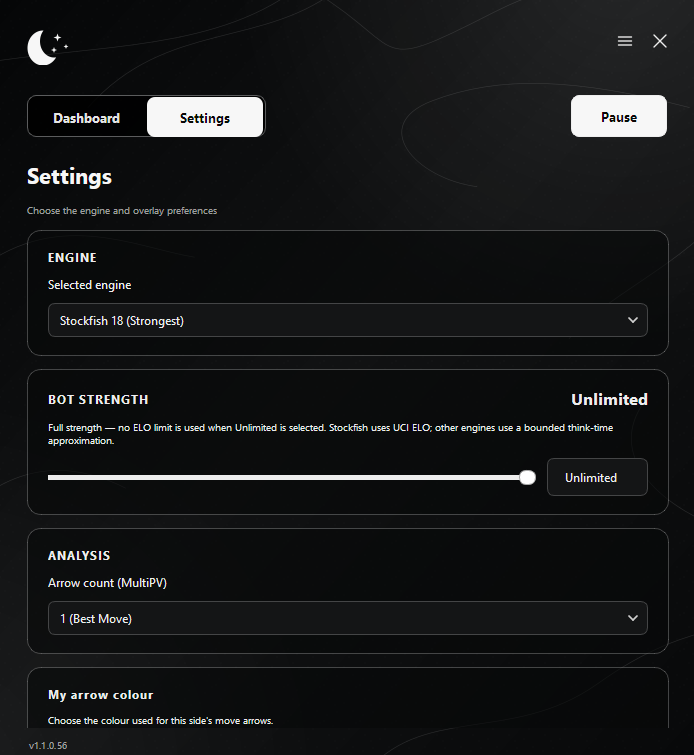
No manual position entry, tab switching, or guessing which variation matters.
The app locates the 8×8 grid on your screen, verifies piece presence, and begins analysis automatically. If focus is lost, it can re-detect the board seamlessly.
LunaChess identifies piece arrangements, board orientation, side to move, castling rights, and en passant, cross-checking positions against official chess rules.
Suggested moves are rendered on a transparent, click-through overlay directly on your board. Never take your eyes off the game.
Analyze between one and four move candidates simultaneously. The top line is highlighted while alternative paths allow side-by-side comparison.
Categorizes engine lines and played moves into Book, Best, Excellent, Good, Inaccuracy, Mistake, or Blunder alongside numerical evaluations.
Recognizes active openings on the fly using a comprehensive position database and Polyglot opening books.
Switch between peak-strength Stockfish, lightweight profiles for low-spec hardware, aggressive Reckless, or the human-like Maia 3 engine.
Set engine rating precisely from 200 to 3190 ELO or select Unlimited to unleash full engine performance.
Individually configure colors for your move suggestions vs. opponent options using a visual picker or HEX values.
Automatically detects piece sets and board colors. Supports various popular themes and caches recognized board layouts.
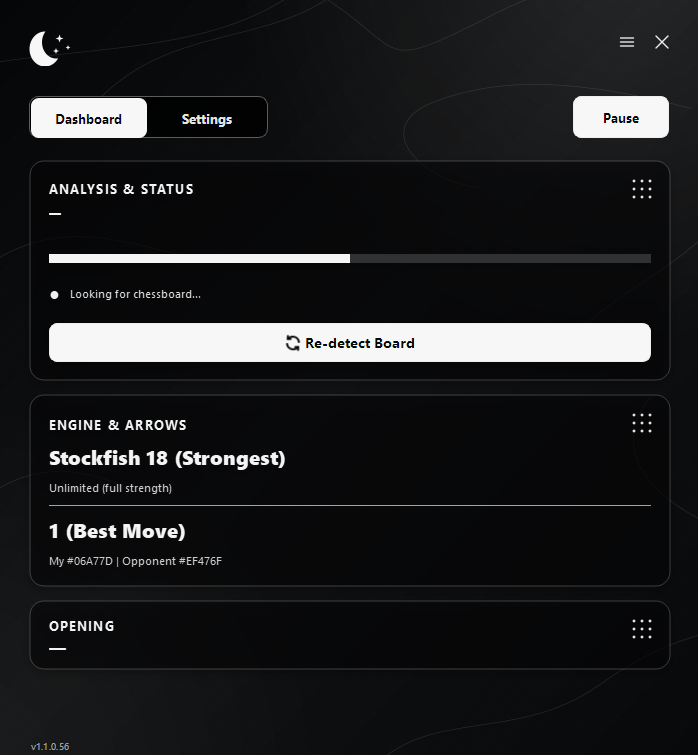
Pause analysis at any moment or force an immediate screen rescan with a single click.
Filters state transitions and verifies move legality to prevent piece animations, square highlights, or temporary board obstructions from breaking analysis.
When enabled, LunaChess can execute selected moves using hardware-level cursor emulation. Configure execution triggers based on search depth or move timer.
The application operates as a compact, non-intrusive panel floating above other windows.
Display any game or position on your monitor. No FEN pasting or account authorization required.
The engine instantly recognizes board bounds, orientation, active pieces, and side to move.
Suggestions, evaluations, and opening details appear instantly inside the panel and over the board.
Advanced Maia build designed for deeper human behavioral matching.
Maximum analytical power and unparalleled tactical precision.
An ideal equilibrium between computation speed and evaluation quality.
Lightweight execution profile tailored for older hardware.
Alternative engine prioritizing active, high-tempo attacking lines.
Engine availability depends on the downloaded package and installed binaries.
Fine-tune the engine, its strength, and how suggestions appear — then let LunaChess remember your setup on your device.
LunaChess goes beyond single-frame capture. It stabilizes successive frames, enforces legal move transitions, and recovers synchronization automatically after window occlusion, tab switching, rematches, or side flips.
Multi-threaded engine execution
✓Zero UI freezing or input lag
✓Background calculation during opponent turn
✓Auto side swap on game restart
✓Auto re-detection upon board recovery
✓Transient animation and highlight filter
✓Visual protection preventing overlay arrows from distorting vision models
✓Persistent on-device configuration saving
✓Comprehensive package containing all Standard features along with the complete Maia 3 neural model for enhanced human-like move analysis.
The ideal build for most users. Includes the main application, the complete Stockfish engine collection, and Reckless.
Windows 10/11 Desktop Application Run LunaChess.exe after extraction
Everything you need to know before running LunaChess on your Windows PC.
No. The application reads board state visually straight from your display.
It is platform agnostic. As long as the board layout and piece set are visible and recognized, LunaChess works across web browsers and standalone clients.
Yes. You can switch to a lighter engine profile, cap the ELO rating, or use lower search depth settings.
MultiPV allows the engine to analyze multiple top candidate moves simultaneously. LunaChess supports 1 to 4 lines.
Yes. Colors for user suggestions and opponent options can be configured separately via visual color pickers or HEX codes.
Click the ‘Re-detect Board’ button. The app will rescan your display to identify active 8×8 grids.
Press Ctrl + Alt + Shift + A. This global shortcut instantly disables the automation module and cancels active cursor movements.
Yes. Vision processing and engine calculations take place entirely on your PC. No data is sent to external servers.
Download LunaChess, pick your preferred engine, and let the software handle board detection, position tracking, and move visualization.